How to Make a Bootable USB drive ? [ Tutorial ]
Once you have resourced or downloaded the ISO file for the OS that you
want to install, you will then need to download a free tool called as
Rufus which will help you to create a Bootable USB flash drives from an
ISO image.You can download this software from given link below the post.
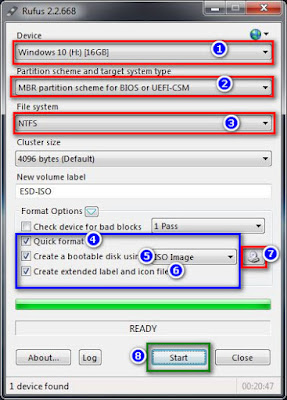 Step 1. Select USB
Step 2. Select “ Select MBR partition scheme for BIOS or UEFI “
Step 3. Select NTFS for File system.
Make sure you select these three options are checked under Format options.
Step 4. Quick Format
Step 5. Create a Bootable disk using ISO Image
Step 6. Create extended labels and icon files
Step 7. Select the Drive icon next to ISO Image and then select ISO file
Step 8. Click Start Button
Enjoy .....!
Downloads
Rufus 2.2 (808 Kb) | Link 1 | Mirrors

Step 2. Select “ Select MBR partition scheme for BIOS or UEFI “
Step 3. Select NTFS for File system.
Make sure you select these three options are checked under Format options.
Step 4. Quick Format
Step 5. Create a Bootable disk using ISO Image
Step 6. Create extended labels and icon files
Step 7. Select the Drive icon next to ISO Image and then select ISO file
Step 8. Click Start Button
Enjoy .....!
Don't miss !
Re-Loader Activator v1.3 Final
Windows 10 All in One ISO
Windows 10 All editions ISO
KMSAuto NET 2015 v1.3.5
Downloads
Rufus 2.2 (808 Kb) | Link 1 | Mirrors
Direct Link



Comments
Post a Comment